The interface
This page is a tour of Cocotte's interface: the top bar, the account menu, the language and theme buttons and the mobile tab bar. It also explains what you can do without an account and what needs one.
Note
Button labels in this guide are quoted in English. Cocotte starts in French, so switch the language first (see Language and theme) if you want the labels to match.
The top bar
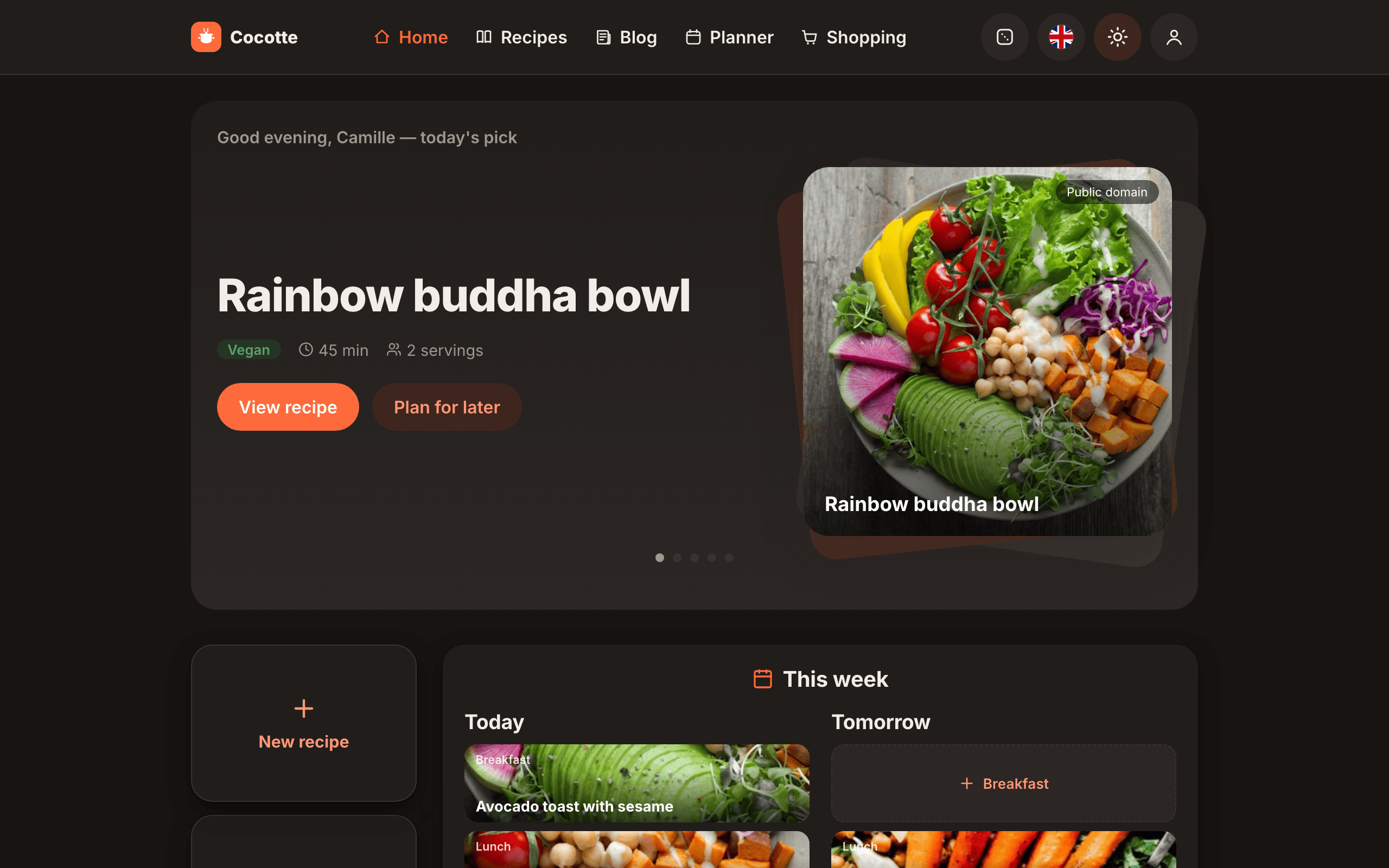
From left to right:
| Element | What it does |
|---|---|
| Cocotte logo | Back to the home page. |
| Home | The home page: latest recipes, your week, thematic shortcuts, seasonal recipes. See Browsing recipes. |
| Recipes | The full recipe list with search and filters. |
| Blog | Posts written by the community, with recipes embedded in them. See Blog. |
| Planner | Your meal planner. Logged-in users only. See Meal planning. |
| Shopping | Your shopping lists. Logged-in users only. See Shopping lists. |
| Dice button (Surprise me) | Opens a random recipe. See Random recipe. |
| Flag button | Language selector (Français / English). |
| Moon / sun button | Switches between light and dark mode. |
| Person button | Logged out: opens the login page. Logged in: opens the account menu. |
The account menu
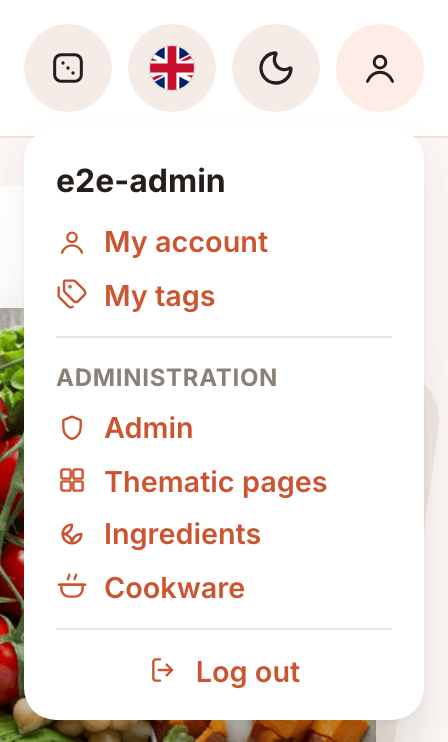
When you are logged in, the person button opens a menu with:
- your username at the top,
- My account: your profile, allergies, appearance, password, data export, agenda sharing and account deletion. See Your account.
- My tags: your personal recipe tags (name, emoji, color). See My tags.
- Administration (staff accounts only): Admin (user management), Thematic pages and Ingredients. These pages are described in the Admin guide.
- Log out.
Click outside the menu or press Escape to close it.
Language and theme
Change the language
- Click the flag button in the top bar.
- Choose Français or English. A check mark shows the current language.
The whole interface switches immediately. Your choice is saved in the browser, so it applies on this device only, whether or not you are logged in.
Note
The language setting translates the interface. Recipe content stays in the language it was written in. Ingredient names from the built-in library are in French.
Dark mode
Click the moon button to switch to dark mode, and the sun button to switch back. On your first visit, Cocotte follows your operating system's light/dark setting. Once you click the button, your choice is saved on this device.
You can also change the accent colour of the app in My account → Appearance. See Your account.
On a phone
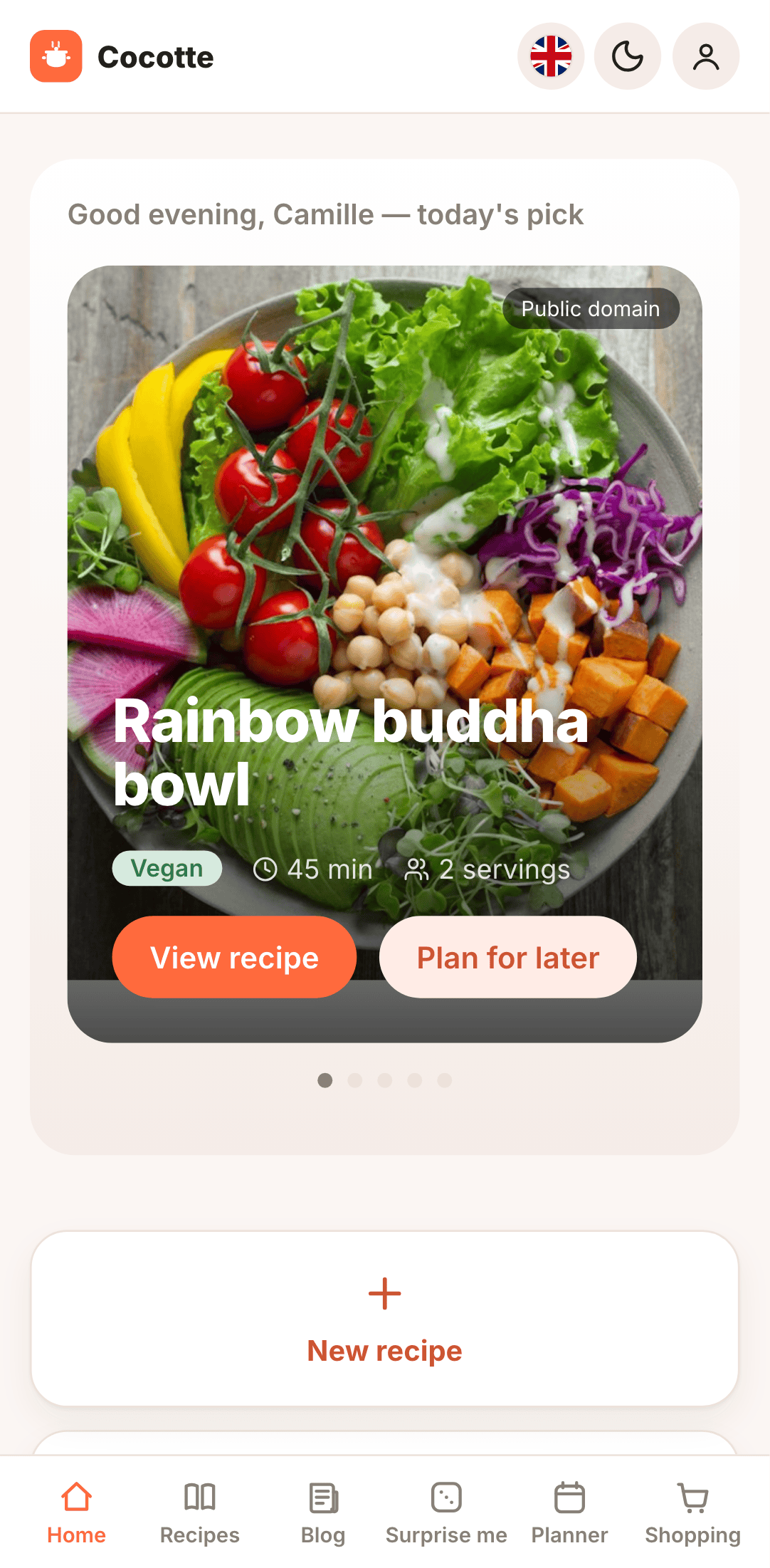
On narrow screens (up to 600 px wide), the text links and the dice button move out of the top bar into a tab bar at the bottom of the screen:
- Home, Recipes, Blog and Surprise me for everyone,
- Planner and Shopping when you are logged in.
The top bar keeps the logo, the language, theme and account buttons.
Tip
Cocotte can be installed like an app on your phone's home screen. See Install & offline.
Visitors vs. logged-in users
You can use part of Cocotte without an account. The login page has a Browse recipes without an account link for that.
| Action | Visitor | Logged in |
|---|---|---|
| Browse the home page, recipe list, filters and random recipe | ✅ | ✅ |
| Read a recipe, its nutrition facts and carbon footprint | ✅ | ✅ |
| Download a recipe as PDF | ✅ | ✅ |
| Read and post comments (visitors must enter a name) | ✅ | ✅ |
| Read blog posts | ✅ | ✅ |
| Write blog posts | — | ✅ |
| Create, import, edit and delete your own recipes | — | ✅ |
| Create a variant of a recipe | — | ✅ |
| Add a recipe to the planner, use the planner | — | ✅ |
| Shopping lists | — | ✅ |
| Allergen filtering and warnings based on your profile | — | ✅ |
If you open a page that needs an account, such as /planning, Cocotte sends you to the login
page. After you log in, you land back on the page you asked for.
Note
Some imported recipes don't show their description and steps to other people: only the person who imported them and admins see them. Their title, ingredients, times, picture, source link, allergens and carbon footprint stay public. See Recipes with restricted content.
Where to go next
- Your account: sign up, log in and set up your profile and allergies.
- Browsing recipes: find and read recipes.
- Creating recipes: add your own.
- Meal planning and Shopping lists: plan the week and shop.
- Blog: read and write posts, with recipes embedded in them.